
If you’ve been using Gemini in Chrome to help with things like recipe tweaks, product comparisons, or scanning long docs, you’ve probably run into the same friction I have: having to retype the same prompt every time you land on a new page. It’s tedious, and honestly, it kills the flow.
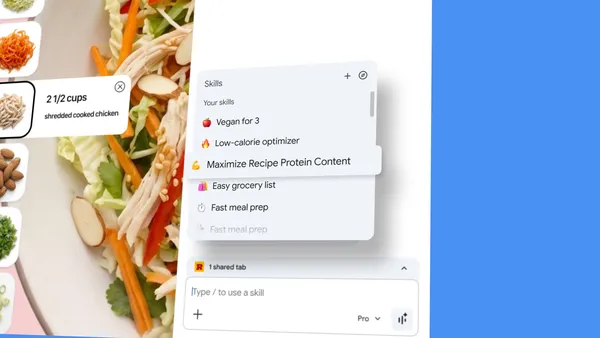
Google’s answer is a feature called Skills, which launched today for Chrome desktop. The idea is simple — save your most useful prompts as reusable one-click tools, then trigger them with a slash (/) or a plus button in the Gemini sidebar. No more copy-pasting or remembering exactly how you phrased that perfect prompt last week.
Saving prompts as Skills
When you craft a prompt that works well — say, “convert this recipe to vegan by listing ingredient substitutions” — you can save it as a Skill directly from your chat history. Next time you’re on a recipe page, just select that Skill from the menu, and Gemini runs it on whatever page you’re viewing. You can even target multiple tabs at once, which is handy for side-by-side comparisons.
The feature is clearly aimed at power users who have a handful of go-to AI workflows. Early testers have used it for things like calculating protein macros from any recipe, generating spec comparisons across shopping tabs, and scanning lengthy documents for key info. These are real, repetitive tasks that benefit from not having to re-enter the same context every time.
A library to get you started
Google also ships a library of pre-built Skills for common tasks. Want to break down ingredients on a product page? Or pick a gift by cross-referencing budget with the recipient’s interests? There are Skills for that. You can add any of them with one click, and if the prompt isn’t quite right, you can edit it to fit your needs. This lowers the barrier for people who aren’t sure what to prompt for, which is a smart move.
Privacy and control
Skills inherit Chrome’s existing security model — prompts that could trigger actions like sending an email or adding a calendar event will ask for confirmation before proceeding. Google also mentions automated red-teaming and auto-update capabilities, which is standard for their AI features at this point. Nothing groundbreaking, but it’s good to see they’re not ignoring the safety angle.
Your saved Skills sync across signed-in Chrome desktop devices, and you can manage them from the compass icon in the Gemini menu. The rollout starts today, so if you’re on the latest Chrome desktop build, you should see it soon.
My take
Skills is a small but meaningful quality-of-life improvement for anyone who uses Gemini in Chrome regularly. It’s not a flashy feature — no new AI model, no big UI overhaul — but it solves a real pain point. The only downside I can see is that it’s currently desktop-only, and the library feels a bit thin out of the gate. I’d like to see community-shared Skills or a way to export/import them, but for now, this is a solid step toward making AI workflows feel less like a chore.
If you’ve been holding off on using Gemini in Chrome because the prompt repetition got old, this might be the nudge you need.
Comments (0)
Login Log in to comment.
Be the first to comment!